I started new video tutorial lesson in rpc programming. Hoe you like it.
https://www.youtube.com/watch?v=YmafTmYl5Qk
http://youtu.be/Z_VR8sxIBkY
Friday, December 6, 2013

Saturday, August 3, 2013
How to import Excel sheet to MYSQL
1. This is my Excel sheet with one table.


2. Save the Excel sheet in .csv format.
3.Open the saved file with a text editor.

4.You can see rows are separated in new lines and columns separated with commas.
5. Create mysql database and create a table with same number of columns as the Excel table.In my example, my sql table fields are username,password and type.
6.Execute this query
LOAD DATA LOCAL INFILE 'C:\\Users\\Monto\\Documents\\Book1.csv' INTO TABLE alumini.login FIELDS TERMINATED BY ',' ENCLOSED BY '"' LINES TERMINATED BY '\r\n' (usrename, password,type);
7. The result

Sunday, June 2, 2013
Simple bracket checking program (python3)
Hi, I have posted a simple bracket checking program in java. That program is based on stacks. Some other programming languages
facilitates to write such a program in much easier. This post is about write such a program in python 3. Enjoy the simple syntax
without object oriented classes and objects.
bracketcheck.py code :

bracketcheck.py code :
def bracketcheck(inputstring):
    inpt=[]
    for i in range(0,len(inputstring)):
        if(inputstring[i]=='('):
            inpt.append('(')
        elif(inputstring[i]=='['):
            inpt.append('[')
        elif(inputstring[i]=='{'):
            inpt.append('{')


        elif(inputstring[i]==')'):
            if(len(inpt)>0):
                if(inpt.pop()=='('):
                    print("")
                else:
                    print("incompatible opening bracket for ')' at position "+str(i+1))
            else:
                print("missing the opening bracket for ')' at position "+str(i+1))


        elif(inputstring[i]==']'):
            if(len(inpt)>0):
                if(inpt.pop()=='['):
                    print("")
                else:
                    print("incompatible opening bracket for ']' at position "+str(i+1))
            else:
                print("missing the opening bracket for ']' at position "+str(i+1))


        elif(inputstring[i]=='}'):
            if(len(inpt)>0):
                if(inpt.pop()=='{'):
                    print("")
                else:
                    print("incompatible opening bracket for '}' at position "+str(i+1))
            else:
                print("missing the opening bracket for '}' at position "+str(i+1))

    if(len(inpt)>0):
        print("error")


def main():
    inputstr=input()
    bracketcheck(inputstr)

main()
The output :

Saturday, May 25, 2013
Web developing using angularjs bootstrap and php
Hi, I did an assignment given by our university. I think this will help you to understand how to use angularjs, bootstrap and php to develop dynamic web sites. I'll put the question and the answer I developed as well.
Task 03
Prepare a HTML form to get subject marks for each student (three subjects for each student) and put them into an array.
Array should be like;
Student 01 marks01 marks02 marks03
Student02 marks01 marks02 marks03
…………
Number of students is 10
Calculate the total marks for each student and save them in an array under “Total”
Calculate the average for each student and save them in the same array under “Average”
Sort the array based on the average marks
Print the results on a table including the student id/name, total, average
Answer
marks.html file
Task 03
Prepare a HTML form to get subject marks for each student (three subjects for each student) and put them into an array.
Array should be like;
Student 01 marks01 marks02 marks03
Student02 marks01 marks02 marks03
…………
Number of students is 10
Calculate the total marks for each student and save them in an array under “Total”
Calculate the average for each student and save them in the same array under “Average”
Sort the array based on the average marks
Print the results on a table including the student id/name, total, average
Answer
marks.html file
<!doctype html>
      <html ng-app><head>
      <link rel="stylesheet" type="text/css" href="lib/bootstrap/css/bootstrap.css">
      <link rel="stylesheet" type="text/css" href="lib/bootstrap/css/bootstrap.min.css">
      <link rel="stylesheet" type="text/css" href="lib/bootstrap/css/bootstrap-responsive.css">
      <link rel="stylesheet" type="text/css" href="lib/bootstrap/css/bootstrap-responsive.min.css">
      <script type="text/javascript" src="lib/angular.min.js"></script>
      <script type="text/javascript" src="lib/jquery-2.0.0.min.js"></script>
      <script type="text/javascript" src="lib/jstorage.js"></script>
      <script type="text/javascript" src="lib/bootstrap/js/bootstrap.js"></script>
      <script type="text/javascript" src="lib/bootstrap/js/bootstrap.min.js"></script>
      <script type="text/javascript" src="marks.js"></script>
 </head>
 <body ng-controller="marks">
      <div class="container" >
           <div class="row">
                <div class="span2">
                     <ul class="nav nav-list">
                      <li class="active"><a href="#">{{name}}</a></li>
                      <li class="active">Dimantha M.G.T</li>
                      <li class="active">CST</li>
                     </ul>
                </div>
                <div class="span10">
                     <form action="marks.php" method="post">
                     <ul>
                          <li ng-repeat="student in data" class="control-group success">
                               <input type="text" ng-model="student.Name" name="stu[]"/><input type="text" ng-model="student.mks1" name="m1[]"/><input type="text" ng-model="student.mks2" name="m2[]"/><input type="text" ng-model="student.mks3" name="m3[]"/></li>
                               <li class="control-group info"><input type="text" placeholder="Name" ng-model="stdName"/><input type="text"placeholder="mks1" ng-model="mrk1"/><input type="text"placeholder="mks2" ng-model="mrk2"/><input type="text"placeholder="mks3" ng-model="mrk3"/></li></li>
                               <li><input type="button" ng-click="addStudent()" value="Add Student" class="btn btn-success"/></li><br>
                               <li><input type="submit" value="Submit" class="btn btn-info"/></li>
                     </ul>
                     </form>
                </div>
           </div>
      </div>
 </body>
 </html>
marks.js filefunction marks ($scope) { // body... $scope.name="CST/10/0011"; $scope.data=[{ "Name":"bbw","mks1":54,"mks2":67,"mks3":71 },{"Name":"thilina","mks1":44,"mks2":84,"mks3":90}] $scope.current={ } $scope.addStudent=function(){ //alert("bbbb") $scope.data.push({"Name":$scope.stdName,"mks1":$scope.mrk1,"mks2":$scope.mrk2,"mks3":$scope.mrk3}) $scope.stdName="" $scope.mrk1="" $scope.mrk2="" $scope.mrk3="" console.log($scope.data) } $scope.submit=function(){ } console.log($scope.data) }
marks.php file
<html>
<head>
<link rel="stylesheet" type="text/css" href="lib/bootstrap/css/bootstrap.css">
 <link rel="stylesheet" type="text/css" href="lib/bootstrap/css/bootstrap.min.css">
 <link rel="stylesheet" type="text/css" href="lib/bootstrap/css/bootstrap-responsive.css">
 <link rel="stylesheet" type="text/css" href="lib/bootstrap/css/bootstrap-responsive.min.css">
</head>
<body>
<div class="row">
 <div class="span2">
  <ul class="nav nav-list">
   <li class="active"><a href="#">CST/10/0011</a></li>
   <li class="active">Dimantha M.G.T</li>
   <li class="active">CST</li>
  </ul>
 </div>
 <div class="span10">
<?php

$name=$_POST["stu"];
$marks1=$_POST["m1"];
$marks2=$_POST["m2"];
$marks3=$_POST["m3"];


for ($i=0; $i<count($marks1); $i++){
 $tot= $marks1[$i]+$marks2[$i]+$marks3[$i];
 $av=$tot/3;
 $total[$i]=array('Total'=>$tot,'Average'=>$av);

}

//sort($total);

foreach ($total as $key => $row) {
    $t[$key]  = $row['Total'];
    $avg[$key] = $row['Average'];
 $id[$key] = $name[$key];
}

array_multisort($avg, SORT_DESC, $t, SORT_ASC,$id, SORT_ASC, $total,$name);

echo "<table class='table table-hover'>";
echo "<tr><th>Student</th><th>Average</th><th>Total Marks</th></tr>";
for ($i=0; $i<count($marks1); $i++){
 printf("<tr><td>%s</td><td>%.2f</td><td>%.2f</td></tr>",$name[$i],$total[$i]['Average'],$total[$i]['Total']);
}
echo "</table>";
?>
</div>

</div>
</body>
</html>
Download the full project with resources http://www.mediafire.com/download/73hzigoh8xxwvdb/answer.zip
Sunday, May 5, 2013
Arrange text files in a directory according to their previous folder names (C#)
This is a program that can re arrange all the text files in a directory in another directory within folders which having their previous folder names. You can try this for any file type (I did for text files).
using System;
using System.Collections.Generic;
using System.Linq;
using System.Text;
using System.Threading.Tasks;

namespace imagecoppy
{
    class Program
    {
        static void Main(string[] args)
        {


           formatDri();

            Console.ReadKey();
        }

        static void renameFiles() {


        }


        static void formatDri() {
            System.IO.DirectoryInfo dif = new System.IO.DirectoryInfo(@"D:\vishwa");
            System.IO.DirectoryInfo[] subdif  = dif.GetDirectories();
            System.IO.DirectoryInfo txtdir = dif.CreateSubdirectory("TEXTFILES");
            System.IO.FileInfo[] dirname;
            foreach (System.IO.DirectoryInfo sub in subdif) {


                dirname = sub.GetFiles("*.txt*");
                if (dirname.Length != 0)
                {
                    txtdir.CreateSubdirectory(sub.Name);
                    foreach (System.IO.FileInfo txtfile in dirname)
                    {

                        txtfile.CopyTo(@"D:\vishwa\TEXTFILES\" + sub.Name + "\\" + txtfile.Name, false);
                    }
            }

            System.IO.FileInfo[] txtInfo=dif.GetFiles("*.txt*");
            // this part is same as the previous post


            }

        }
    }
}
Saturday, May 4, 2013
Write a program to organize files in a folder (C#)
Hi, This is a program to organize files in a folder by type. You can do this for file size ,last access time or any other attribute as your wish. This program select a specific type of files among all files in a folder and create a sub folder for the type and copy all the files of that type to the created folder. Try this.
using System;
using System.Collections.Generic;
using System.Linq;
using System.Text;
using System.Threading.Tasks;

namespace imagecoppy
{
    class Program
    {
        static void Main(string[] args)
        {
            System.IO.DirectoryInfo di = new System.IO.DirectoryInfo(@"C:\Users\Monto\Pictures");
            di.CreateSubdirectory("JPJs");

            System.IO.FileInfo[] fileNames = di.GetFiles("*.png*");
            foreach (System.IO.FileInfo fi in fileNames)
            {
                Console.WriteLine("{0}: {1}: {2}", fi.Name, fi.LastAccessTime, fi.Length);
                fi.CopyTo(@"C:\Users\Monto\Pictures\JPJs\"+fi.Name,false);
            }

            Console.ReadKey();
        }
    }
}
Look at some java codes of parallel programs http://tjisblogging.blogspot.com/
Tuesday, April 9, 2013
Insertion Sort - Algorithm (Simple sorting Techniques)
Hi, I described two simple sorting techniques in previous two posts. This post will describe Insertion sort.
Look at the following Unsorted array.


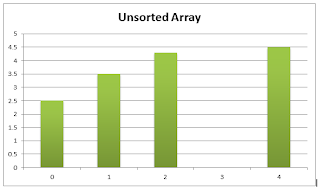


Look at the following Unsorted array.

figure 01
Takeout an element from the array. Compare it with the elements with lower indexes. Shift those elements to right while find a smaller element than element 1. If n'th element is smaller than the selected element , insert element 1 in n+1'th place.
Round 01:
Step 01: Takeout element 1 from the array(figure 02).

figure 02
Step 02: Compare element 1 with element 0. element 0 is larger than element 1. So shift element 0 to position 1(figure 03).

figure 03
Step 03: Insert element 1 in position 0(figure 04).

figure 04
Round 02:
Step 01: Takeout element 2 from the array(figure 05). Assign it to a temp variable.

figure 05
Step 02: Compare temp with element 1. element 1 is larger than temp. So shift element 1 to position 2 (figure 06)

figure 06
Step 03: Compare temp with element 0. element 0 is smaller than temp. So insert temp in position 1 (figure 07).

figure 07
Round 03:
Step 01: Takeout element 3 from the array(figure 08) and assign it to temp.

figure 08
Step 02: compare temp with element 2. element 2 is larger than temp. So no need to shift. temp inserted in the position 3(figure 07).

Round 04:
Step 01: Takeout element 4 from the array(figure 09) and assign it to temp.

figure 09
Step 02: Compare temp with element 3. element 3 is larger than temp. So shift element 3 to position 4 (figure 10).

figure 10
Step 03: Compare temp with element 2. element 2 is larger than temp. So shift element 2 to position 3 (figure 11).

figure 11
Step 04: Compare temp with element 1. element 1 is larger than temp. So shift element 1 to position 2 (figure 12).

figure 12
Step 05: Compare temp with element 0. element 0 is smaller than temp. So no need to shift. Insert temp in position 1(figure 13)

figure 13
Overview
After four Rounds, the array is sorted.This technique can used when a part of the array is already sorted. This technique is better for almost sorted arrays.

figure 14: a partially sorted array
We don't need to worry about the sorted area. We can start the sorting from the beginning of the unsorted area. According to figure 14, sorting should start with element 5.
Java code for Insertion Sort
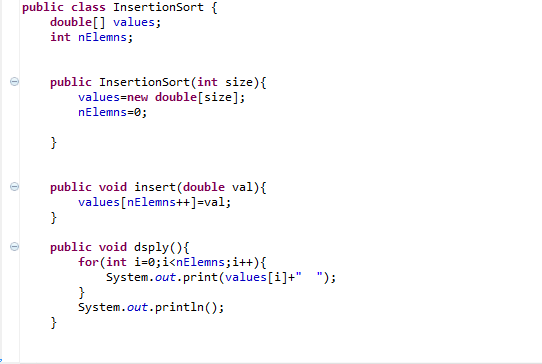

The Runner class


Download the code from here
Subscribe to:
Posts (Atom)